Move the selfie elsewhere
Ask to replace only the source video’s setting with your location, retaining its camera moves and solo order. A separate scene photo is a location reference, never a fourth performer.
Start with your main photo. Add up to two friend or pet photos, or let the model invent those roles. The source selfie clip supplies the camera moves, solo order and group finale. The generator sends that clip together with your photos.
PROMPT
Use this in a video tool that supports a reference clip and photos. See the setup steps below.
The reference clip and prompt are already set up. Add your photos below and pay once to generate your video.
Written for this template’s cast and scene options. The linked creator post is a visual reference. Results vary by model and photos.
1 reference video + 1–3 photos
@Video1Reference videoProvided@Image1You · main performerRequired@Image2Friend 2Optional@Image3Friend 3OptionalKit: reference video, prompt & photo checklist. Bring your own photos.
Use as a starting point. Results depend on your chosen video tool.
TEMPLATE · FRIENDS & MUSIC
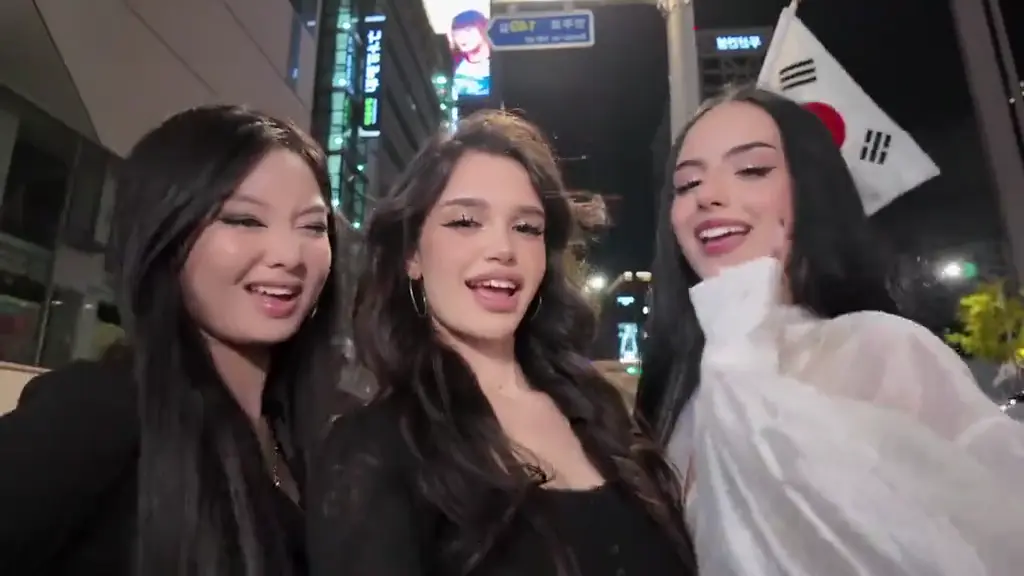
Three friends, one phone and a night in Gangnam. Add your photo, invite up to two friends or pets, and give everyone a solo before the group finale.
ExampleCreator examples from public posts, shown for reference. Not made with AI Trend Clips. Sources: @emiliyyam
Your photo is required. Add either friend, both, or neither. Empty friend spots become fictional AI characters. A pet can take any role.
A clear portrait or pet photo. Opens the selfie and gets the first solo.
One adult or pet for the second solo. Leave blank for an AI friend.
One adult or pet for the third solo. Works even if Friend 2 is empty.
Setting
Checking template availability…
Still needed: You · main performer
HOW TO USE IT
Upload the full source selfie clip as @Video1 to a video-reference model that accepts its 21.6-second duration, such as Seedance 2.5. Set the output to 21 seconds, 16:9 and 720p. Assign the photos to A, B and C in the CAST paragraph. If Friend 2 is empty, name the next uploaded photo C explicitly.
Each tag in the prompt points to one upload: @Image1 = You · main performer · @Image2 = Friend 2 (optional) · @Image3 = Friend 3 (optional).
Match the prompt’s reference labels to your tool’s input names. Keep each photo assigned to the same role when you paste the prompt.
Three distinct identities · Pets stay animals · One coherent location
MAKE IT YOURS
Ask to replace only the source video’s setting with your location, retaining its camera moves and solo order. A separate scene photo is a location reference, never a fourth performer.
TROUBLESHOOTING
Keep the CAST mapping explicit and use well-lit separate photos. Avoid asking for extra characters or a different solo order in the scene field.
GOOD TO KNOW
Yes. Use a model that accepts a reference video together with identity photos. Upload the source clip, match the cast labels to your photo order, and set the duration and aspect ratio shown here.
Add your photo, pay once and download your video in minutes.