Photo assignments
Assign @Image1 to the foreground flexer and @Image2 to the background partner if supplied. With one photo, specify a fictional adult in the background.
The main prompt assumes all photo slots are filled. Choose a matching version below for fewer photos and adapt the image labels to your tool.
PROMPT
Use 1 to 2 photos as separate identity references in a multi-image video tool. This template does not need a reference video.
The story and settings are already prepared. Add your photos below and pay once to generate your video.
Written for this template’s cast and scene options. The linked creator post is a visual reference. Results vary by model and photos.
1–2 photos · no reference video needed
@Image1Foreground flexerRequired@Image2Background partnerOptionalKit: prompt & photo checklist. Add your own photos as separate identity references.
Use as a starting point. Results depend on your chosen video tool.
PROMPT
Use this version when only the first photo is supplied.
Use as a starting point. Results depend on your chosen video tool.
AI VIDEO TEMPLATE
Create a 9-second bicep heart: the person in front flexes an arm and frames the partner’s face inside the heart. Add one or two adult photos.
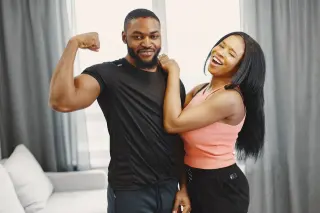 Stock photo · Pexels
See creator examplesPrompt & tutorialWaist Heart · make a solo waist pose
Add the foreground flexer’s photo. Add a second adult for the background, or leave it empty for a fictional adult.
One clear photo of one adult.
Optional: one clear photo of one adult.
Checking template availability…
Still needed: Foreground flexer
HOW TO USE IT
Use an image-to-video model with one or two identity photos. Choose 9 seconds, vertical 9:16 and 720p where supported.
Each tag in the prompt points to one upload: @Image1 = Foreground flexer · @Image2 = Background partner (optional).
Match the prompt’s reference labels to your tool’s input names. Keep each photo assigned to the same role when you paste the prompt.
Check the identity · Check hands and movement
MAKE IT YOURS
Assign @Image1 to the foreground flexer and @Image2 to the background partner if supplied. With one photo, specify a fictional adult in the background.
TROUBLESHOOTING
If the heart is unclear, describe the arm positions and contact explicitly and check the full movement.
GOOD TO KNOW
The second photo supplies the person behind the foreground flexer. If you provide only the first photo, the prompt requests a fictional adult behind them.
The prompt asks for original instrumental music without the trend song; generated audio can vary. For a specific track, check your platform’s music library and usage rules.
Add your photo, pay once and download your video in minutes.